Duplicate content is the same text, or nearly the same, reachable at more than one URL, within your site or across different sites. Google does not penalise it by default: it picks one version as the canonical and groups the rest. The problem is that it may pick the one you do not want, split signals between copies and spend crawling on repeated pages.
On most small business sites I review, nobody created the duplication on purpose: the content management system generates it. Below are the types, how to find it and which fix applies in each case.
| What it is | The same content at more than one URL |
|---|---|
| Is it penalised? | Not by default; yes if content is copied to manipulate results |
| Where to see it | Page indexing report in Search Console |
| Fixes | Canonical, 301 redirect or noindex, depending on the case |
What duplicate content is (and is not)
To Google, each different URL is a different page. If your product page opens with http and https, with and without www, and with and without a trailing slash, you have eight addresses with the same content. Google resolves it by choosing one, the canonical, which is the one it shows in results.
What does not exist is a “duplicate content penalty” as an automatic punishment. Google only acts when other people’s content is copied to manipulate results. Having the same page at two of your own URLs is an efficiency problem, not a sanction.
Types of duplicate content: internal, parameter-based and external
| Type | Real example | Usual fix |
|---|---|---|
| Internal, domain variants | http and https, www and non-www, with and without a trailing slash | 301 redirect to a single version |
| Internal, from the CMS | The same article under the category, the tag and the date archive; print version | Canonical to the original; noindex on archives that add nothing |
| Internal, repeated copy | City pages with the same text and only the town name changed | Rewrite them with their own content or merge them |
| Parameters | ?utm_source=, ?sort=price, ?colour=blue, session identifiers | Canonical to the clean URL |
| External, yours | The same site on a .cat and a .com; an article of yours republished on a portal | 301 between domains; canonical to the original on the republished copy |
| External, someone else’s | The manufacturer’s description, identical in every shop selling the product | Write your own description |
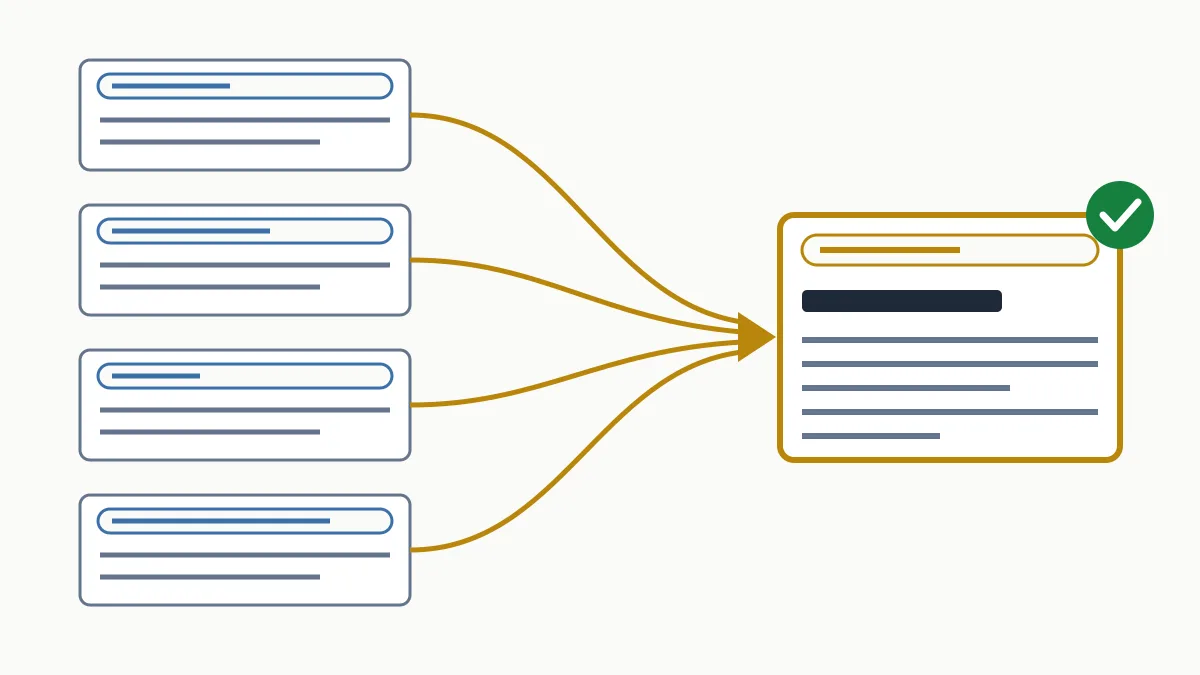
Parameters are the case that grows most without anyone noticing. An online shop in Sabadell with 300 products and filters for size, colour and sort order can expose thousands of URLs with the same listings.
A note for Catalan sites: the Catalan version and the Spanish version of a page are not duplicate content. Google treats translations as different pages, as long as the main content is genuinely translated.
Duplication is not cannibalisation
The two are often confused. With duplicate content, the text is the same at several URLs. With cannibalisation, the texts differ but two pages compete for the same search: for example, a service page and a blog article both trying to rank for “employment lawyer Lleida”. Duplication is fixed with technical signals; cannibalisation, by deciding which page targets what. It is covered in SEO cannibalisation: how to detect and fix it.
How to detect duplicate content
- Search Console, page indexing report. Look at the reasons for non-indexing that mention duplicates: “Duplicate without user-selected canonical”, “Duplicate, Google chose different canonical than user” and “Alternate page with proper canonical tag”. The last one is normal; the second is the one to investigate.
- URL inspection. For a specific address it shows the canonical you declared and the one Google selected. If they do not match, you have work to do.
- Test the variants by hand. Type your domain with http, with www and without the trailing slash. They should all end up at the same address.
- Search for a sentence in quotation marks. Copy a long sentence from a page and search for it on Google in quotes: you will see whether it appears at other URLs of yours or on other sites.
If you do not know how to read these reports, the guide on how to use Google Search Console goes through them step by step.
Fixes: canonical, 301 redirect or noindex
| Fix | What it does | When it applies |
|---|---|---|
| 301 redirect | Sends users and Google from the copy to the original | The copy should not exist: domain variants, merged pages, old domain |
| Canonical tag | States which URL you want to represent the group | The copy must stay accessible: parameters, filters, print version |
| Noindex | Removes the page from Google’s results | The page is useful on the site but should not appear on Google: internal search, date archives |
The rule I use: if the copy is not needed, 301; if it is needed but must not compete, canonical; if it should not be on Google, noindex. Redirects and canonicals are strong signals, but a canonical is a hint: Google may ignore it if the other signals say something else.
For the canonical to be respected, everything else has to agree: internal links point to the canonical version and the sitemap lists only canonical URLs. If you would like us to review your site’s setup, see the technical SEO service.
Mistakes when fixing duplicate content
- Blocking the copies with robots.txt. If Google cannot crawl the page, it cannot see the canonical you put on it.
- Pointing every page’s canonical at the home page. You are telling Google the whole site is a copy of the home page.
- A canonical pointing to a URL that redirects or returns an error. The signal becomes useless.
- Mixing noindex and canonical to pick the right version within one site. Google recommends not using noindex for this: it removes the page from results instead of consolidating it.
- Fixing the symptom, not the source. If the menu links to the version with parameters, the duplication will come back.
Frequently asked questions
Does Google penalise duplicate content?
Not by default. When it finds the same content at several URLs, it chooses one as canonical and shows that one. It only acts against content copied from other sites with the intention of manipulating results.
What percentage of duplicate content is allowed?
Google has not published any threshold. Repeated headers, footers and legal text are normal; what matters is that the main content of each page is its own.
Can I use the manufacturer’s description in my shop?
You can, but you will compete with the same text every shop selling the product has. Rewrite at least the pages of your best-selling products.
Are the Catalan and Spanish versions of my site duplicate content?
No. Translations are considered different pages if the main content is translated. It is worth indicating the relationship between languages with hreflang.
What do I do if another site has copied my content?
Google usually identifies the original. If the copy outranks you or took your whole text, you can ask the site to remove it and, if it does not respond, ask Google on copyright grounds.
Duplicate content is rarely serious, but it should be you, not Google, who decides which URL represents each page. If you want to know how many duplicate addresses your site has and which ones need fixing, ask for the free initial analysis.