The hreflang tag is an annotation that tells Google which version of a page belongs to each language or country, so every user is shown their own: the Catalan page for people searching in Catalan, the Spanish one for people searching in Spanish. It translates nothing and does not lift rankings by itself; it stops the wrong version from showing up in the results.
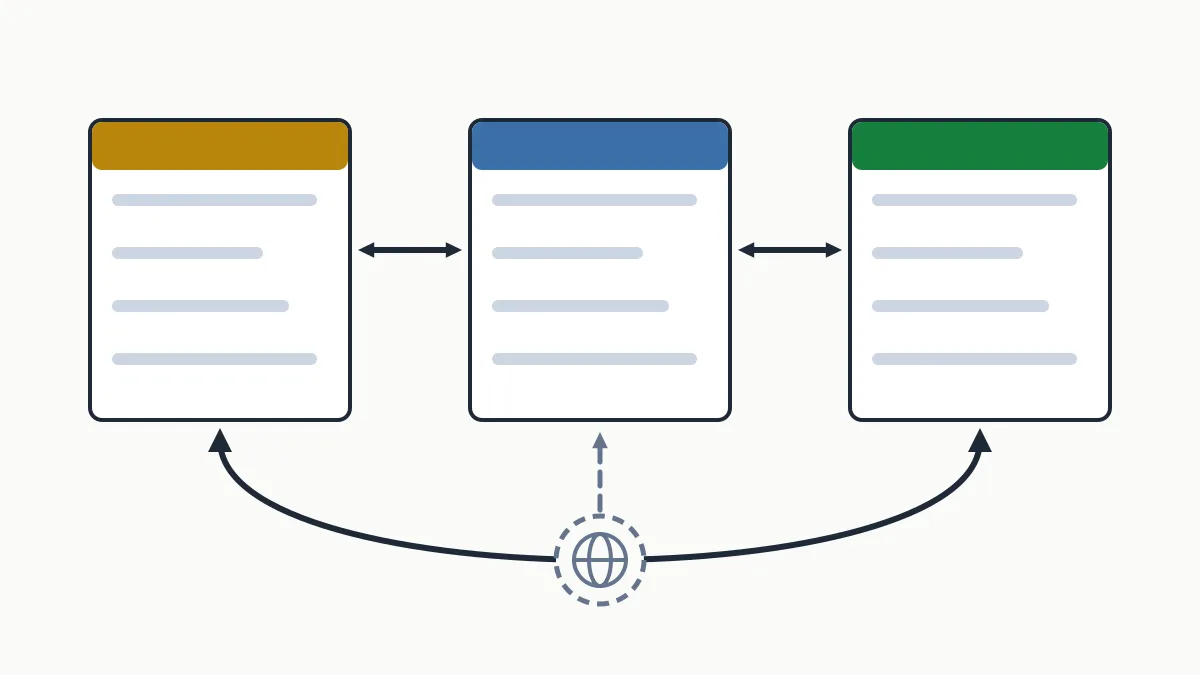
You can declare it in three places (the <head>, the HTTP header or the XML sitemap) and one rule decides almost everything: if page A points to page B, page B has to point back to page A. When that return link is missing, Google may ignore the whole annotation. Below you will find the exact syntax, examples you can copy and the most common mistakes on sites in Catalan, Spanish and English.
What hreflang is and when you need it
It is an attribute of the <link rel="alternate"> element that ties together the versions of one page. With it, Google understands that /ca/serveis/, /es/servicios/ and /en/services/ are the same page in three languages and picks which one to show based on the searcher's language and country.
You need it when:
- The same page is translated into several languages (the typical case for a Catalan SME: Catalan, Spanish and sometimes English or French).
- You serve the same language to several countries, with near-identical content and differences in price, currency or shipping (Spain and Mexico, for instance).
- Only the template (menu, footer) is translated and the main content stays in one language, as happens on forums or pages with user-generated content.
You do not need it if your site is in a single language and targets a single market.
lang attribute to work out which language a text is in: it infers it from the content. If the “English” version still carries half its copy in Spanish, the tag will not fix that.The decision that comes first (which countries to sell in and how to organise the site for it) is covered in the guide to international SEO for a Catalan SME. Here we stick to the tag.
Hreflang tag syntax
This is the full block for a page in three languages. It is identical on all three versions:
<link rel="alternate" hreflang="ca" href="https://www.example.com/ca/serveis/" />
<link rel="alternate" hreflang="es" href="https://www.example.com/es/servicios/" />
<link rel="alternate" hreflang="en" href="https://www.example.com/en/services/" />
<link rel="alternate" hreflang="x-default" href="https://www.example.com/en/services/" />rel="alternate": states that the URL is an alternate version of the page.hreflang: the language code in ISO 639-1 format (ca,es,en) and, if you want to narrow it down by country, a hyphen plus the ISO 3166-1 alpha-2 country code (es-ES,es-MX,en-GB).href: the absolute URL, with protocol and domain.
The language is mandatory; the country is optional. A country code on its own is not valid: Google would read it as a language (be is Belarusian, not Belgium).
| Value | Correct? | Why |
|---|---|---|
ca | Yes | Catalan, for any country |
es-ES | Yes | Spanish for users in Spain |
en-GB | Yes | English for the United Kingdom |
en-UK | No | The ISO code for the United Kingdom is GB |
es_ES | No | The separator is a hyphen, not an underscore |
es-LA, en-EU | No | LA is Laos, not Latin America, and EU is not a country code |
If you target by country, always add a generic version of the language to catch every other speaker:
<link rel="alternate" hreflang="es-ES" href="https://www.example.com/es-es/" />
<link rel="alternate" hreflang="es-MX" href="https://www.example.com/es-mx/" />
<link rel="alternate" hreflang="es" href="https://www.example.com/es/" />
Where it goes: head, HTTP header or sitemap
All three methods are worth the same to Google. Pick one; if you combine two, they must say exactly the same thing.
| Method | When it fits | Watch out for |
|---|---|---|
Tags in the <head> | Sites with few languages. It is what most CMSs and multilingual plugins generate | They must sit inside the <head>, not in the body |
Link HTTP header | Non-HTML files: PDFs, documents | It has to be configured on the server |
| XML sitemap | Many languages or many pages: it adds no weight to the HTML | Every URL repeats the full group |
In the HTTP header
For a price-list PDF in three languages, the server returns this header (on a single line) with each of the three files:
Link: <https://www.example.com/ca/tarifes.pdf>; rel="alternate"; hreflang="ca", <https://www.example.com/es/tarifas.pdf>; rel="alternate"; hreflang="es", <https://www.example.com/en/rates.pdf>; rel="alternate"; hreflang="en"In the XML sitemap
You declare the xhtml namespace and every <url> lists all the versions, itself included:
<?xml version="1.0" encoding="UTF-8"?>
<urlset xmlns="http://www.sitemaps.org/schemas/sitemap/0.9"
        xmlns:xhtml="http://www.w3.org/1999/xhtml">
  <url>
    <loc>https://www.example.com/ca/serveis/</loc>
    <xhtml:link rel="alternate" hreflang="ca" href="https://www.example.com/ca/serveis/" />
    <xhtml:link rel="alternate" hreflang="es" href="https://www.example.com/es/servicios/" />
    <xhtml:link rel="alternate" hreflang="en" href="https://www.example.com/en/services/" />
    <xhtml:link rel="alternate" hreflang="x-default" href="https://www.example.com/en/services/" />
  </url>
  <url>
    <loc>https://www.example.com/es/servicios/</loc>
    <xhtml:link rel="alternate" hreflang="ca" href="https://www.example.com/ca/serveis/" />
    <xhtml:link rel="alternate" hreflang="es" href="https://www.example.com/es/servicios/" />
    <xhtml:link rel="alternate" hreflang="en" href="https://www.example.com/en/services/" />
    <xhtml:link rel="alternate" hreflang="x-default" href="https://www.example.com/en/services/" />
  </url>
  <url>
    <loc>https://www.example.com/en/services/</loc>
    <xhtml:link rel="alternate" hreflang="ca" href="https://www.example.com/ca/serveis/" />
    <xhtml:link rel="alternate" hreflang="es" href="https://www.example.com/es/servicios/" />
    <xhtml:link rel="alternate" hreflang="en" href="https://www.example.com/en/services/" />
    <xhtml:link rel="alternate" hreflang="x-default" href="https://www.example.com/en/services/" />
  </url>
</urlset>
If you do not have a sitemap yet or are not sure how to submit it, the guide to the XML sitemap explains it.
What x-default is
hreflang="x-default" marks the page for anyone who matches none of the declared versions: a user searching in German on a site that only has Catalan, Spanish and English. It is not mandatory, but it is recommended.
It usually points to a language selector or to the version you prefer for visitors from abroad. For an SME in Girona that sells to tourists, the sensible choice is the English version as x-default; for one that only works in Catalonia, the Catalan or Spanish one. The same URL can appear twice: once with its language and once as x-default, as in the example above.
Reciprocity: the rule that gets broken most
Every version has to list all the versions in the group, itself included. And the relationship must run both ways: if /ca/serveis/ declares /es/servicios/ as an alternate, /es/servicios/ has to declare /ca/serveis/. Otherwise Google may ignore those annotations or misread them.
The rule makes sense: without a return link, any website could declare itself an alternate version of one of your pages.
Two practical consequences:
- Only equivalent pages are paired. If an article exists only in Catalan, it does not carry hreflang towards the Spanish home page: it carries only its own, or none.
- Each version is its own canonical. If
/es/servicios/has a canonical pointing to/ca/serveis/, you are telling Google the Spanish version should not be indexed, and hreflang stops making sense. I explain it in the post on the canonical URL.
The most common hreflang mistakes
- The return link is missing. A new language is added and only that language's template is updated.
- Made-up codes:
en-UK,es_ES,catinstead ofca. - Relative URLs (
/es/servicios/) or URLs without the protocol. They must be absolute. - Pointing to URLs that are not the final one: URLs that redirect, return a 404, carry noindex or have their canonical on another page.
- Every page points to the home page of the other language instead of its own translation. It is the classic fault of a badly built language switcher.
- Hreflang on the home page only. It is declared page by page, not once for the whole site.
- Redirecting automatically by IP or browser language. Googlebot crawls mostly from the United States and without an
Accept-Languageheader, so it may never reach the other versions. A notice suggesting a language switch is better than a forced redirect.
How to check your hreflang
- Open the source code of one page in each language and search for
hreflang. The block must be the same on all of them. - Open every
href: it must answer with a direct 200, with no redirect. - Check that each version lists itself and that its canonical is its own URL.
- In Search Console, inspect one URL per language to confirm it is indexed and that the canonical Google selects is its own. Search Console no longer has a dedicated hreflang report, so you read the outcome in Performance: filter by country and see which page appears for each query. If the report is new to you, see how to use Google Search Console step by step.
Google applies the changes once it has recrawled every version in the group, so do not expect to see them the next day.
If you would rather have us review it, hreflang is part of the platform's technical SEO checks, and you can start with a free initial analysis of your site.
Frequently asked questions
Does hreflang improve rankings?
Not directly. It does not make a page climb; it makes Google show the version for the right language or country. The effect shows in users landing on a page they understand and staying.
Do I need hreflang if my site is only in Catalan and Spanish?
It is recommended. With two languages there are already two versions of every page, and hreflang confirms to Google that they are equivalent and which one belongs to each language.
Is x-default mandatory?
No. It is optional, but worth adding so that you decide what people who match none of your languages will see.
Does hreflang replace the canonical tag?
No, they work together. Canonical marks the main URL among duplicates; hreflang links versions in different languages. Each version needs its own canonical and the full hreflang group.
Can I use hreflang across different domains?
Yes. The versions do not have to live on the same domain: a .cat and a .com can declare each other as alternates, as long as both link to each other.
In short
Hreflang is little code and a lot of discipline: correct ISO codes, absolute and final URLs, the same block on every version and a return link every time. If a multilingual site shows the wrong language on Google, reciprocity is the first thing to look at. Want to know how yours is doing? Ask for the free initial analysis.