What is a landing page? It is a web page built so that the visitor does one single thing —request a quote, book, leave their details or buy— after arriving from an ad, an email or a specific search. Unlike the homepage, it does not split attention: one offer, one message and one call to action.
Below you will find what it is for, how it differs from the homepage and from a service page, which parts it needs and the mistakes that cost the most enquiries.
| What it is | A page with a single goal and a single call to action |
|---|---|
| Where the visit comes from | Ads, emails, social media, QR codes or a very specific search |
| What it asks for | One step: form, call, booking or purchase |
| How it is measured | Conversion rate: visits that take that step |
What a landing page is, with an example
The name is literal: it is the page where someone lands after clicking somewhere specific. Technically, any page a visit enters through is a landing page, and that is what analytics tools call it. In marketing, though, the term has stuck to the page designed specifically to convert that visit into an enquiry or a sale.
An example. A dental clinic in Sabadell runs a campaign for clear aligners. If the ad leads to the homepage, the person finds implants, whitening, the team and the blog, and has to hunt for the thing that made them click. If it leads to a landing page, they see exactly what the ad promised: what the treatment is, who it is for, what the first appointment looks like and a button to book. Nothing else.
That continuity between what the person saw before the click and what they find after it is what makes a landing page work. The rest is execution.
What a landing page is for
It exists so you do not waste a visit that has already cost you money or effort. Specifically:
- Capturing leads: quote requests, first appointments, demos, phone calls.
- Selling a specific offer: a product, a bundle, a promotion with an end date.
- Filling sign-ups: a course, a workshop, an open day.
- Growing a list: a downloadable guide or a newsletter in exchange for an email address.
- Measuring a campaign: because all the traffic from one action lands in the same place and there is only one possible step, you know how many visits took it and what each enquiry cost you.
That last point is often forgotten. A landing page is also a measuring instrument: if you send the campaign to the homepage, you will never know for sure whether the ad or the page failed.
Differences from the homepage and a service page
All three can look alike, but they answer different questions from the visitor.
| Homepage | Service page | Landing page | |
|---|---|---|---|
| Goal | Introduce the business and direct people | Explain one service in depth | Get one specific action |
| Where the visit comes from | Brand searches, direct traffic | Google searches, the site menu | A campaign or a specific link |
| Navigation | Full menu | Full menu and links to related services | Minimal or none |
| Calls to action | Several | One main and perhaps a secondary one | Just one, repeated |
| Lifespan | Permanent | Permanent | Often tied to a campaign |
| Indexed by Google | Yes | Yes, it is the one that should rank | It depends: many are kept out of the index |
The homepage is a hub: it receives people with very different intentions and has to route them. The service page is part of the site's permanent structure and works to get you found on Google. The landing page receives traffic whose origin and intent you already know, which is why it can afford to get straight to the point.
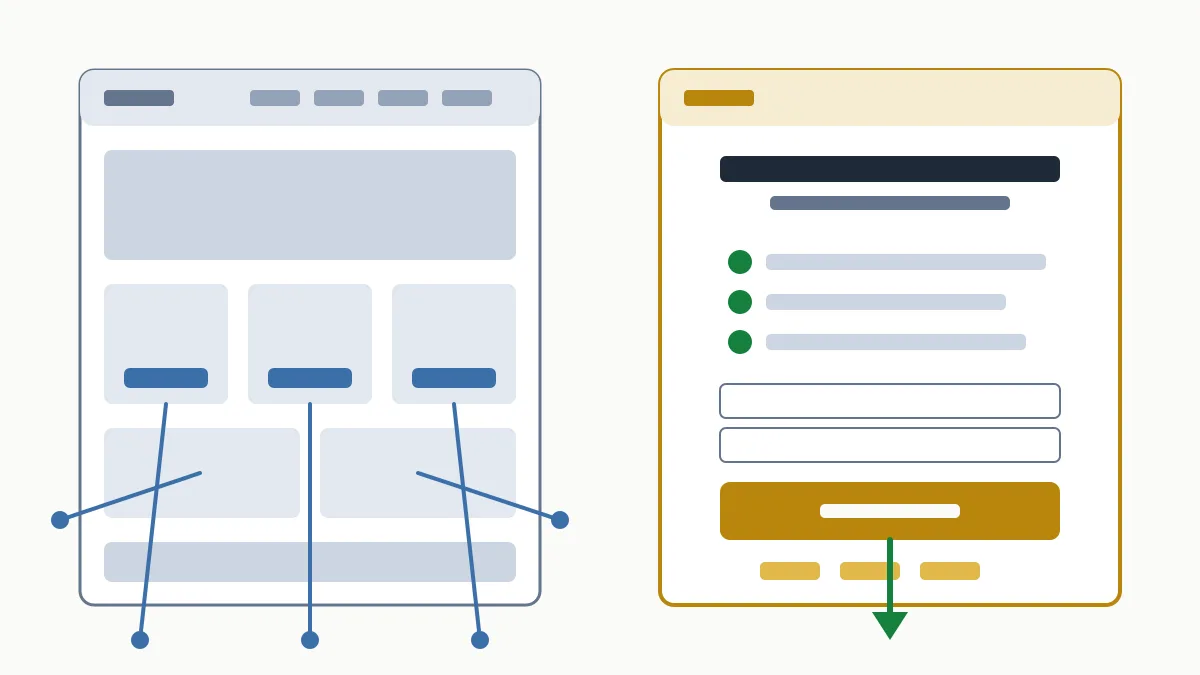
Types of landing page
- Lead capture: the goal is a form or a call. It is the most common type for services: renovations, accountancy firms, clinics, academies.
- Click-through: it explains the offer and leads to the product page or the checkout. Common in online shops and subscriptions.
- Thank-you page: the one shown after the form is sent. It does not capture anything, but it confirms the request, says what happens next and is the point where the conversion is counted.
Parts of a landing page
There is no magic template, but landing pages that work almost always share these pieces, in this order:
- Headline that repeats the promise of the ad or email, in the same words.
- Subheading that spells out who it is for and what they get.
- Call to action visible without scrolling, with text that says what happens on click (“Request a quote”, not “Submit”).
- Benefits explained from the customer's problem, in three or four points.
- Proof: real reviews, photos of finished work, certifications, years in the trade.
- Answers to objections: indicative price, timescales, what happens after they leave their details.
- Short form: only the fields you need to make first contact.
- Trust details: who is behind it, phone number, address and legal notices.
If you have no website, or the one you have cannot host pages like this, a well-planned basic website can already include the service pages that will do this job.
Common landing page mistakes
- Sending the campaign to the homepage. The basic mistake: the visitor has to search again for what they had already chosen.
- Promising one thing in the ad and another on the page. If the ad says “quote within 24 hours” and the landing page does not mention it, trust drops in the first second.
- More than one goal. Form, newsletter, social media and chat all at once: every added option takes away from the main one.
- An endless form. Asking for a tax number, address and available budget for a first contact makes many people give up halfway.
- Ignoring mobile. A button off screen, small text or a form that is impossible to fill in with a thumb.
- Slow loading. Huge images and scripts nobody needs. You can check it for free with PageSpeed Insights.
- Not measuring. Without a conversion event set up you do not know what works. We cover it in what Google Analytics is.
- No trust signals. No reviews, no address, no people: nobody leaves their phone number on an anonymous page.
Landing pages and SEO
Can a landing page rank on Google? Yes, if it answers a search and has content of its own. In fact, service pages and city pages do exactly that: they are landing pages for organic traffic, and they are optimised like any other page (see on-page SEO).
Campaign landing pages are a different case. They tend to be short, they repeat the offer of a service page that already exists and they expire with the promotion. That is why it is common to keep them out of the index with a noindex tag, so they neither compete with the permanent page nor leave outdated results on Google.
When the traffic comes from ads, the destination page also counts for the advertising system: landing page experience is one of the components of Quality Score in Google Ads. We explain how the auction works in what Google Ads is.
Frequently asked questions
Is a landing page the same as a website?
No. A website has many pages and several goals; a landing page is a single page with a single goal. It can be part of your site or built separately, but it is always one piece, not the whole.
Do I need a landing page if I already have a website?
If you run paid campaigns or email sends with a specific offer, yes: it will convert better than the homepage. If you only receive traffic from Google, improving your service pages first is usually the better investment.
Should a landing page have a menu?
In campaigns, the usual approach is to remove it or cut it to the minimum so the only way out is the call to action. On a service page acting as an organic landing page, the menu stays.
How many landing pages does a small business need?
As many as the different offers you promote. The practical rule is one landing page per campaign or per service with its own audience, not a generic one for everything.
How do I know if my landing page works?
By looking at the conversion rate: out of every hundred visits, how many take the action you ask for. Compare it across campaigns and change one element at a time to learn what improves it.
In short
A landing page is the answer to a simple question: what do I want this visit to do? If your website does not make that clear on every important page, you are losing enquiries. Request the free initial analysis and we will tell you which pages on your site should be converting and why they are not doing so today.